Imagine a small bakery tucked into one of Toronto’s bustling neighbourhoods. The owner makes the most aromatic croissants in town, but she struggles to attract new customers online because her website targets broad terms like “bakery”. Meanwhile, a rival café around the corner ranks for “best croissant Queen Street West, Toronto” and consistently sees foot traffic from hungry commuters. The difference? The café invested in low‑competition keywords, search phrases with modest traffic but little competition, which make them visible to people searching nearby.
This guide breaks down what low‑competition keywords are and why they matter for local SEO.
What Are Low‑Competition Keywords?
Low‑competition keywords (sometimes called low‑difficulty keywords) are search queries with relatively low keyword difficulty and modest search volume. SEO tools estimate difficulty mainly based on the authority and backlink profiles of ranking domains, while SERP features may impact click-through rates. Because fewer websites compete for them, these keywords offer easier rankings and quicker wins. They often include long‑tail descriptors, think “24‑hour pediatric dentist” instead of simply “dentist”.
In local SEO, low‑competition keywords usually contain location modifiers and intent words such as “near me,” “open late,” “best,” “affordable,” or a neighborhood name. For example:
High‑competition keyword:“plumber” (generic and fiercely contested)
Low‑competition local keyword:“emergency plumber North York tonight” (long‑tail, specific and less contested)
These longer, location‑rich phrases convert better because people using them are ready to act. They reduce the need for expensive backlinks and ads, making them ideal for small businesses on modest budgets.
These low‑competition terms act as local SEO keywords, signalling to search engines that your services are tied to a specific city or neighbourhood. When you choose the right local SEO keywords, your business becomes more visible to nearby customers who are ready to purchase.
Why Low‑Competition Keywords Matter for Local Businesses
Targeting low‑competition keywords can dramatically impact your visibility and revenue:
Speed to the Top: With fewer pages vying for ranking, your content can climb to page one in weeks rather than months.
Budget Happiness: Lower difficulty means you can rank without a huge backlink budget or costly ads.
Hyper‑Local Accuracy: Phrases that include street names, landmarks or neighborhood slang scream relevance to Google. For example, “Queen Street shoe repair Downtown” signals exactly where you operate and what you offer.
Warm, Ready Customers: Users searching “pressure washer rental in North York today” aren’t browsing; they’re looking to hire now.
These benefits arise because Google prioritizes relevance, distance, and prominence when ranking local results. Low‑competition keywords improve relevance (matching the query precisely), help you appear in searches close to your location, and enhance prominence when combined with positive reviews and citations.
How to Identify Low‑Competition Keywords
1. List Your Services and Location Modifiers
Start by listing every product or service your business offers. Add modifiers such as “near me,” “open late,” “24/7,” “best,” “affordable,” or local nicknames. For Toronto, you might include neighbourhoods like Downtown, North York, Scarborough, Etobicoke or landmarks like Yonge Street and High Park. Combine each service with these modifiers. For example:
“HVAC repair Scarborough open late”
“best math tutor North York”
“emergency electrician near Yonge Street”
Think like a customer with no industry knowledge. A parent might search “child vaccination centre Yonge Street Toronto” rather than “paediatric health clinic.”
2. Leverage Search Intent Modifiers
Intent modifiers convey urgency or value. Words like “best,” “top‑rated,” “cheap,” “same‑day,” “reviewed,” and “emergency” highlight what users want. Pair them with your service and location to deepen the long‑tail. For example:
“same‑day carpet cleaning North York affordable”
“top‑rated restaurant Scarborough”
3. Drill Down to Micro‑Locations
Don’t stop at city names. Include neighbourhoods, postal codes, markets or landmarks. A search for “dentist in Leslieville Toronto” has lower competition than “dentist Toronto.” Use micro‑location terms like “near Union Station” or “close to Eaton Centre.”
4. Tap Google’s SERP Features
Google’s search results page is itself a free keyword generator. Type your service plus location (e.g., “Toronto plumber”) and examine the following:
Map pack descriptions: Competitors’ Google Business Profiles often include target keywords like “24‑hour plumber” or “water leak repair”.
People also ask: The question boxes reveal real queries tied to your service, which can become blog topics or FAQ entries.
People also search for: At the bottom of the page, this section surfaces alternative modifiers and related services.
These insights reflect what people actually search for, giving you low‑competition ideas without leaving Google.
5. Use Keyword Tools (Even Free Ones)
Once you have a list, validate search volume and difficulty using tools. Here are some popular options and how to use them effectively:
Tool
Why You’ll Love It
Quick‑Start Tip
Google Keyword Planner
Free, uses real Google data, good for volume checks
Enter a seed term, filter by location and sort by competition; look for low‑competition terms.
Ubersuggest
Clean interface, shows difficulty and volume in one view
Use the “Content Ideas” tab to spy on low‑competition posts already driving traffic.
Ahrefs
Provides deep SERP analysis and accurate keyword difficulty scores
Click “Keyword Explorer,” set your city under “Traffic Potential,” and export terms with KD < 20.
Semrush
Offers keyword gap analysis, local tracking, and competitive insights
Run “Keyword Magic,” apply a difficulty filter (0–29), and sort by search volume.
A simple workflow: enter “mobile bike repair Toronto”, set the tool to filter keywords with a difficulty under 25 and search volume above 30, then sort by lowest difficulty. Repeat this process for each service until you’ve banked twenty or more phrases for future pages or blog posts.
6. Build an Initial Keyword List from Competitors
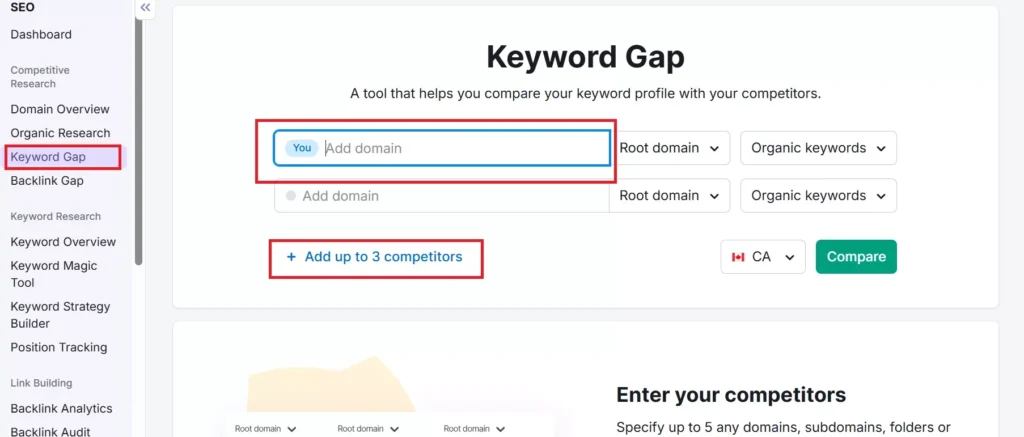
If you use Semrush or a similar platform, start by analyzing competitor domains. Look for keywords they rank for in the top 100 organic results and filter by low difficulty percentage. Add these to a keyword manager list. You can also use the Keyword Gap tool to compare multiple domains and identify phrases you’re missing. These competitor gaps often hide high‑intent, low‑competition gems.
7. Expand Your List with Related Queries
Use keyword suggestion tools to find synonyms, question‑based queries, and long‑tail variations. In Semrush, the Keyword Magic Tool suggests related phrases you might not have considered. Import these to your list and later filter for high search volume and low difficulty.
8. Explore Advanced Strategies
Once you’ve covered the basics, explore the following techniques to discover more low‑competition keywords:
Research New Niches: Use market analysis tools (e.g., Semrush’s Market Explorer) to identify emerging topics where competition is light. For example, new eco‑friendly products, home automation services or seasonal activities in your region (think winter patio enclosures or summer rooftop gardens in Toronto).
Semantic Keyword Analysis: Look beyond exact phrases; integrate semantically related keywords to broaden content relevance. Tools like Semrush’s On‑Page SEO Checker suggest related words used by top‑ranking pages.
Content Gap Analysis: Compare your content with competitors’ to identify keywords they rank for but you don’t. Focus on low‑difficulty phrases with decent volume, then create new content to target those gaps.
Location‑Based Keyword Discovery: Use keyword overview tools to check search metrics in specific cities, counties or neighborhoods. This is crucial in metropolitan areas like Toronto where search patterns differ by neighbourhood.
Intent‑Based Differentiation: Distinguish between informational and commercial intent. Informational queries like “how to fix a leaking faucet” are less competitive and suitable for blog posts, while commercial terms like “buy refrigerator Toronto” or “plumber appointment North York” signal purchase intent. Target both, but prioritize low‑competition phrases at each stage.
Service‑Focused Keyword Targeting: For service businesses, look for service‑specific, intent‑based, long‑tail and location‑based terms. Examples: “house cleaning appointment Leslieville Toronto”, “wedding photographer Yorkville quote.” These phrases have higher conversion rates because they capture users ready to book.
Where to Use Your Low‑Competition Keywords
Identifying great keywords is only half the battle. You must place them strategically across your online presence to signal relevance to Google and help users find you. Here are prime locations:
Website Core Pages
Homepage hero section: Instead of a generic headline like “Welcome,” craft a value statement that features your primary keyword. For example, “Expert HVAC Repair in North York – warm homes by sunset.” This immediately tells visitors (and Google) what you do and where you operate.
Service pages: Create separate pages for each service and location combination. For example, “Emergency Furnace Repair Scarborough” or “Wedding Photography Services Yorkville.” Use synonyms and related low‑competition keywords throughout the page so Google grasps the context.
Location pages: If you serve multiple areas (Toronto, North York, Scarborough, Etobicoke, York, Mississauga), build unique landing pages for each. Ensure each page contains original content tailored to that locality. Reusing or slightly tweaking content is ineffective; Google rewards unique, localized information.
FAQs: Answer common questions using question‑style keywords discovered from People Also Ask boxes (e.g., “What is the cost of gutter cleaning in Toronto?”). These natural phrases improve your chances of appearing in voice search and answer box results.
Google Business Profile (GBP)
Your GBP is the single most important asset for local visibility. Optimize it with low‑competition keywords:
Business description: Summarize what you offer, who you serve and where you’re located. Include keywords naturally; avoid stuffing. For example, “Family‑owned bakery offering custom cakes and bread in Downtown Toronto and North York.”
Services and products: Describe each service with long‑tail phrases, such as “24‑hour mobile tyre repair near Yonge Street.”
Posts: Publish weekly updates using new keywords. Announce seasonal offers or events like “Now booking holiday dessert trays in Liberty Village Toronto.” Regular posts show activity and help you rank for more terms.
Reviews: Encourage satisfied customers to mention specific services and locations in their reviews. Google uses review quality, quantity and recency as ranking signals. Always respond to reviews politely; this strengthens your local presence.
Local Blog Posts
Blogs offer a platform to answer questions, showcase expertise and rank for long‑tail queries. Create posts like:
“Top 5 things to check before hiring a fence installer in Scarborough.”
“Where to rent a helium tank in North York – prices and pro tips.”
Each post should target one or two low‑competition keywords derived from People Also Ask suggestions. Use conversational language and answer questions thoroughly.
Local Directories and Niche Sites
Many directories allow customized titles and descriptions. Include keywords naturally for example, “Toronto Gutter Cleaning – Same‑Day Service” in the title field. Repeat the term once in the description in a helpful way. Listings in niche sites (e.g., Toronto community blogs or neighbourhood forums) send signals of relevance and build backlinks.
Industry‑Specific Placement
To visualize how this works across industries, here’s a table inspired by competitor examples but customized for Toronto businesses. Keep the descriptions concise; the detailed explanation belongs in the text.
Industry
Smart Low‑Competition Keyword (Example)
Where to Place It
“Basement flood cleanup Scarborough urgent”
“Basement flood cleanup Scarborough urgent.”
Emergency page + ad headline
Real Estate
“condos under $800k North York”
Blog post + listing page
Café
“oat‑milk latte Liberty Village”
Menu page + Google Post
Yoga Studio
“prenatal yoga classes Danforth evenings”
Class schedule + FAQ
Tailoring
“bridal dress alteration Yorkville same‑day”
Service page + Instagram bio
Home Tuition
“O‑Level physics tutor Yonge Street afternoon”
Tutor profile + blog Q&A
By weaving two low‑competition keywords per priority page and sprinkling more across posts and directories, you build a web of relevance that signals to Google: “This business owns this neighborhood.”
Common Mistakes to Avoid
Even the best keyword plan can fail if you fall into these traps:
Keyword Stuffing: Repeating phrases like “best budget florist Liberty Village” ten times on one page feels spammy and can hurt rankings. Aim for natural flow; one or two mentions plus synonyms are sufficient.
Targeting Locations You Don’t Serve: Optimizing for “lawn care Montreal” when you operate exclusively in Toronto confuses Google and customers. Only target areas where you genuinely provide services.
Ignoring Analytics: Use Google Search Console to track which keywords are bringing clicks and impressions. Adjust quickly when something underperforms—drop irrelevant terms and double down on winners.
Copy‑Pasting Location Pages: Each location page must have unique content tailored to that area. Copying content across pages can lead to duplicate content issues and poor performance.
Neglecting NAP Consistency: Inconsistent name, address and phone number (NAP) citations can reduce credibility. Run an audit and ensure all listings match exactly.
Integrating Local SEO Ranking Factors
Google states that local rankings are mainly based on relevance, distance and prominence. Here’s how low‑competition keywords fit into each factor:
Relevance: Targeted keywords help Google match your profile to specific searches. Provide complete and detailed info in your Business Profile, website and listings.
Distance: Include micro‑location terms to ensure you appear in searches near your business. Keep your address and coordinates accurate.
Prominence: Build authority through quality backlinks, positive reviews and structured data. Encourage customers to leave reviews mentioning your services and locality. Add schema markup (LocalBusiness) with your business name, address, phone, hours and geo‑coordinates, and embed a Google Map on your contact page.
Here’s a practical roadmap for implementing a low‑competition keyword strategy in Toronto or any city. Time estimates assume you’re working evenings after business hours (adjust to your schedule). Bold lines indicate key actions.
Define Your Services and Service Areas (Day 1, 30 minutes)
List every service/product offered. Note synonyms and alternative descriptions.
Identify all localities you serve: Downtown, North York, Scarborough, Etobicoke, York, Mississauga, etc.
Combine services with intent and micro‑location modifiers to generate an initial keyword list.
Gather Keyword Ideas from SERPs (Day 2, 45 minutes)
Search Google for your service + location combinations.
Note phrases appearing in map pack descriptions, People Also Ask and People Also Search For.
Use suggestions like “24‑hour,” “best,” “cheap,” “open now,” or seasonal triggers such as “summer AC maintenance” or “winter heater repair.”
Validate Keywords with Tools (Day 3, 1 hour)
Use Google Keyword Planner or Ubersuggest to check search volume and difficulty. Focus on terms with KD < 30 and monthly search volume > 30.
Group keywords by service and location for easier planning.
Create or Optimize Core Pages (Days 4–6, 2 hours per page)
Homepage: Rewrite the hero section to include your top keyword and location. Add a short paragraph describing your unique selling proposition.
Service Pages: Build separate pages for each service/location combination. Keep content unique; include headings, bullet lists, testimonials and calls to action.
Location Pages (if applicable): Write detailed descriptions of how you serve each area, including landmarks, road names and community-specific tips. Use location keywords early in titles, meta descriptions and H1 tags.
Optimize Your Google Business Profile (Day 7, 1 hour)
Update your business description with your primary low‑competition keywords and service areas.
Add photos, hours, services and products; ensure NAP consistency.
Publish a new post highlighting an event or seasonal offer with a targeted keyword (e.g., “Holiday dessert trays in Liberty Village Toronto”).
Develop Blog Content and FAQs (Weeks 2–3)
Plan blog posts around questions uncovered in People Also Ask. For example, “How much does gutter cleaning cost in Toronto?”
Write detailed answers; include step‑by‑step instructions, price ranges, and local context. Use structured data (FAQ schema) to improve visibility in AI‑generated answers.
Create an FAQ page on your website; list common queries with natural language responses.
Build Citations and Local Links (Month 1)
Audit existing citations; correct any inconsistent NAP details across directories.
Submit listings to relevant Canadian business directories (e.g., YellowPages.ca, 411.ca), review sites (e.g., TripAdvisor Canada for hospitality), and local chambers of commerce.
Reach out to local bloggers or news sites for backlinks—perhaps sponsor a community event and ask for a mention. Look for community newsletters and neighbourhood Facebook groups.
Monitor Performance (Ongoing)
Use Google Search Console to track impressions and clicks for your targeted keywords.
Check your GBP insights for search queries that triggered views. Adjust your keyword list based on actual search phrases.
Review analytics monthly. Drop keywords with zero traction and double down on phrases generating leads.
Seasonal and Cultural Considerations
Toronto’s seasons and cultural events drive search patterns. Adapt your keyword strategy to align with local demand:
Winter (December–February): Snowstorms prompt searches for snow removal, furnace repair and winter tire installation. Keywords like “emergency snow removal Downtown Toronto,”“furnace repair Scarborough,” and “winter tires near Yonge Street” peak in this period.
Spring (March–May): Homeowners focus on landscaping, spring cleaning and exterior repairs. Target phrases such as “lawn aeration North York,”“spring gutter cleaning Etobicoke,” and “deck staining services Toronto.”
Summer (June–August): Festivals like Caribana and Pride draw visitors; keywords related to event catering, outdoor patios, boat tours and air conditioning installation surge. Consider phrases like “Pride parade catering Liberty Village,”“roof‑top patio installation Downtown,” and “air conditioner installation North York.”
Fall (September–November): Cooler weather leads to leaf removal, furnace tune‑ups and holiday event planning. Use keywords such as “leaf removal services Scarborough,”“furnace tune‑up York,” and “Thanksgiving catering High Park.”
Being aware of seasonal peaks helps you capture timely low‑competition keywords before your competitors do.
Need Help?
Low-competition local SEO keywords help you rank faster without wasting budget, but lasting results need expert guidance and ongoing care. Search trends change, local intent shifts, and competitors adapt, which is why many businesses choose professional support. If you want stronger local rankings, more calls, and steady growth, Wide Ripples Digital can help. We build people-first SEO strategies for businesses across Toronto, the GTA, and Canada. Call +1 437-499-8233 or visit wideripples.com to get started today.
Quick FAQs
What are low‑competition keywords in plain English?
Low‑competition keywords are specific search terms that fewer websites target, making them easier to rank for. They often contain long‑tail descriptors such as service type, location and urgency. For example, “affordable AC repair near Liberty Village” has much less competition than “AC repair.”
Why do low‑competition keywords matter so much for local businesses?
Google uses relevance, distance and prominence to rank local results. Low‑competition keywords boost relevance by matching what customers actually type and help you appear in searches close to your business. They also convert better because searchers are ready to act.
How can I find low‑competition keywords without paying for expensive tools?
You don’t need a paid account to start. Use Google’s autocomplete suggestions, People Also Ask boxes, and Google Keyword Planner. Combine your service with location and intent modifiers, then validate with free tools like Ubersuggest or limited free searches on Semrush. Focus on micro‑locations and synonyms.
Where should I place these keywords on my site?
Naturally integrate them into your homepage headline, service pages, location pages, FAQs and blog posts. Avoid overusing them. Also update your Google Business Profile description and posts with these keywords.
How often should I update or expand my keyword list?
Local search trends change with seasons, new neighborhoods and shifting demand. Review your keyword list quarterly. Use Search Console to identify new queries and drop underperforming terms.
What are some common mistakes to avoid?
Avoid keyword stuffing, targeting areas you don’t serve, copying content across location pages, and ignoring analytics. Also ensure your NAP information is consistent across all listings.
Do I still need backlinks for local SEO if I target low‑competition keywords?
Yes, but you can prioritize quality over quantity. Positive reviews, local partnerships and citations build prominence. Aim for relevant local backlinks (e.g., from neighborhood blogs, local news sites or business associations). Combined with low‑competition keywords, these links improve your authority and help you outrank larger competitors.
Disclaimer: The information provided in this blog is for general informational purposes only. For professional assistance and advice, please contact experts.
Neha Ghauri, a graduate, has seven years of experience in writing for the digital marketing, finance, and business industries. She specializes in SEO-driven...