Customers search near me and click the first helpful local result. If your location page is not built for that moment, you stay invisible. It does not matter how good your service is if the page does not answer fast.
This is a practical playbook for Location Pages for SEO that focuses on impressions, clicks, visitors, and rankings. You will learn what to build, how to optimize, and how to measure with a template, a schema example, and a simple 90 day checklist.
Read this once and you will know exactly what to change on your site to win more local clicks and visits.
Understand Local Search Intent Before You Build
Local pages work best when they match what the searcher wants right now. Most searches fall into three intent buckets.
Nearby intent
People want something close and quick
Examples electrician near me, dentist open now, coffee shop near me
Research intent
People compare options before they decide
Examples best web designer in Mississauga, top plumbers Mississauga, SEO agency reviews Mississauga
Transactional intent
People are ready to call or book today
Examples book massage Mississauga, emergency locksmith Mississauga, same day roof repair Mississauga
Mapping intent to page type is the shortcut. Office pages help with nearby intent. Service area pages help with research and transactional intent. City hub pages help broad research across many areas.
Quick tip. Open Google Search Console and filter queries that include near me and your city names. You will spot intent gaps fast and know which page type you need next.
Keyword Strategy City + Service, Modifiers, and Intent Phrases
The safest way to rank is one page, one main target. Build around service plus city, then support it with intent modifiers.
Use this simple three-keyword cluster per location page.
Primary
Service plus City
Secondary
Service near me or best Service in City
Long tail
Service for a specific need in City
Example emergency service in City or pricing for service in City
To prioritise keywords, use three signals that map to revenue.
Search volume shows demand.
CPC often signals lead value.
Conversion intent signals speed to action.
A fast rule that works. If the keyword sounds like a buyer, build it first. Words like emergency, same day, quote, pricing, open now, book, and near me tend to convert.
This is the core of Local Search SEO. You match the words people use when they are ready to choose.
Page Structure & Content That Converts
A high-performing location page does two jobs. It answers fast and proves you are real in that area. Use this exact structure and you will make the page easier to rank and easier to convert.
Template you can copy
H1 that includes city and service
40 to 80 word local intro that states who you help and where
Three benefit bullets that focus on outcomes
A short services list that matches real offerings
Local proof block with one case snapshot and real signals
Local FAQ section that mirrors voice searches
A single CTA that makes the next step obvious
Map block only if you have a real office location
Word count guide. Aim for 600 to 1,200 words as a baseline. If your market is competitive, go longer only when you add proof, examples, and useful answers.
Three H3 prompts that keep the content clear
How we help in City
Neighbourhoods we serve in City
What happens after you contact us
Technical SEO & Local Schema You Must Add
Great content fails when technical basics are messy. Fix these once, and every location page becomes easier to crawl and trust.
Essentials to add
Mobile first speed
Keep images compressed and pages lightweight
Canonical setup
Each location page should self self-canonical to avoid duplicates
Hreflang only if bilingual
Use it only when you publish real language versions of the same page
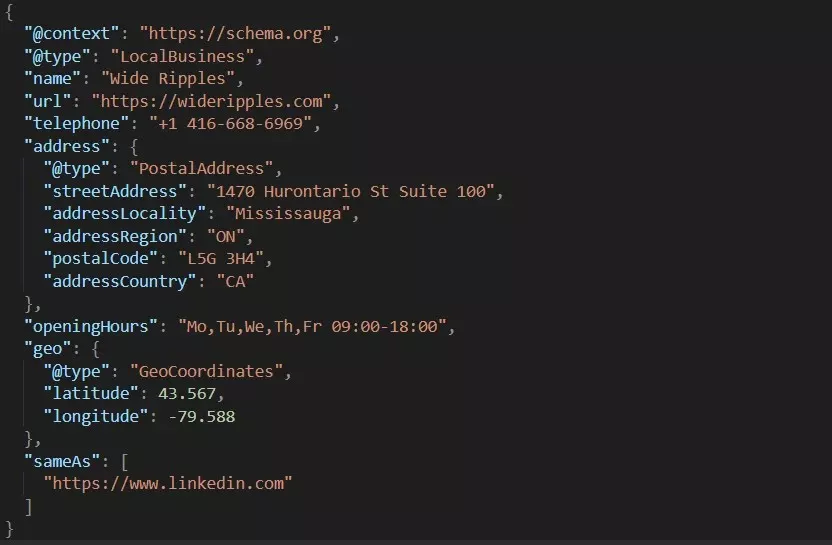
LocalBusiness schema in JSON-LD
Add name, phone, address if applicable, hours, geo coordinates, and social profiles
Here is a short JSON LD example you can adapt for the LocalBusiness schema. Keep it aligned with what is visible on the page.
Testing matters. Run the page through Google’s Rich Results Test and fix errors before you publish more pages.
Google Business Profile & On-Page Signal Integration
Your Google Business Profile and your location page should tell the same story. When they match, you improve trust signals and reduce confusion.
Use this alignment checklist.
NAP matches everywhere
Name, address, and phone should match your site and listings
Categories match page services
Your primary category should match the main service on the page
Hours match
If you claim open hours, show them on the page too
Website link points to the right page
Link GBP to the most relevant location page, not always the home page
Posts link to matching pages
If you post about a city offer, link to that city page
A strong KPI here is driving directions clicks for office-based businesses. It often signals high intent local traffic.
Meta Titles, Descriptions & Rich Snippet Copy That Improves CTR
Ranking without clicks is wasted. Your title and snippet must earn the click and set the right expectation.
Use this meta title formula: Service in City plus primary benefit plus brand
Example: Web Design in Mississauga, Faster Leads and Clean UX | Brand
For the meta description, lead with the result and close with a simple next step.
Local service in City with clear pricing and fast response. View services and request a quote today.
For richer snippets, focus on three things. Write FAQ questions like real voice searches. Make benefits specific and scannable. If you show pricing, keep it honest and consistent with the page.
Internal Linking, Siloing & URL Strategy for Multiple Locations
Structure helps Google understand your site and helps users move to the next step. The cleanest approach for most brands is a folder structure.
Use this URL pattern locations slash city, e.g. ontario/mississuaga
Build a simple silo that supports relevance and prevents keyword overlap. Your goal is to avoid pages competing for the same query.
Here is a safe internal linking pattern.
City hub page links to each city page
City page links to the main service page
Main service page links back to top city pages
Anchor text should sound natural, not forced. Use phrases that mirror how people search, like service in City or City service areas.
This is also where many teams get stuck on How to rank location pages. Siloing plus clean internal links often fixes it.
Reviews, Citations & Local Proof – The Trust Signals that Boost Rankings
Trust signals lift rankings and CTR because they reduce doubt. This is the section where Location Pages for SEO become more than content. They become proof.
Prioritized citation targets for most businesses
Google Business Profile
Bing Places
Apple Business Connect
Yelp
Top industry directories for your niche
Review the request message you can reuse
Hi Name, thanks again for choosing us. If you can leave a quick review and mention the service and the city, it helps local customers find the right option faster.
Then bring proof onto the page. Add a small reviews section, a short case snapshot, and one local photo. If you use a review schema, only mark up reviews that are visible on the page and owned by your site.
Measure What Matters – Local KPIs & Reporting Dashboard
AEO (Answer Engine Optimization) friendly pages still need measurement. You should track signals that lead to calls, bookings, and revenue.
Track these KPIs
Search Console impressions and clicks for each city page
Average position for service plus city queries
CTR for each location page result
GBP actions like calls and directions
GA4 conversions from location pages
Call tracking numbers if calls drive sales
Dashboard layout that stays simple
Search Console for queries and CTR
GA4 for engagement and conversions
GBP for local actions
Call tracking for phone lead quality
Cadence that works
Weekly checks for drops and wins
30-day review for CTR and conversions
90-day review for scale decisions
90-Day Playbook & Why a Local SEO Partner Speeds Results
If you want faster outcomes, you need a plan that ships pages and improves them with data.
90-day checklist
Week 1
Map intent and keyword clusters
Choose three priority cities
Build a page template
Weeks 2 to 4
Publish three location pages
Add local proof and FAQs
Submit pages for indexing
Link them from the city hub
Month 2
Align GBP and on page signals
Start a review routine
Fix top citations and NAP consistency
Improve titles for better CTR
Month 3
Scale to more cities using the same rules
Add one new proof block per city page
Test two meta title versions on top pages
Expand FAQs based on real queries
A local SEO partner often speeds results because scale is where mistakes happen. A good partner handles schema, GBP alignment, site structure, and CRO updates so you see more local visibility, more clicks, and more calls without guessing.
Conclusion:
If you want local clicks, your pages must answer fast, feel local, and prove you are real. Do that consistently and the rankings follow.
Want a quick win with zero guesswork? Wide Ripples will audit one location page for free and tell you exactly what to fix first, what to build next, and how to track results. Request your free location page audit and start turning local searches into calls.
Neha Ghauri, a graduate, has seven years of experience in writing for the digital marketing, finance, and business industries. She specializes in SEO-driven...