LinkedIn Lead Generation in Canada: A Simple Posting + DM System
You have been sending connection requests on LinkedIn. Maybe a few DMs too. The replies are quiet. The calls are rare. And the silence stings, right? If you run a Canadian business and want real conversations with real buyers, the answer is not more pitches. It is a simple rhythm of posts that earn trust, and messages that feel human.
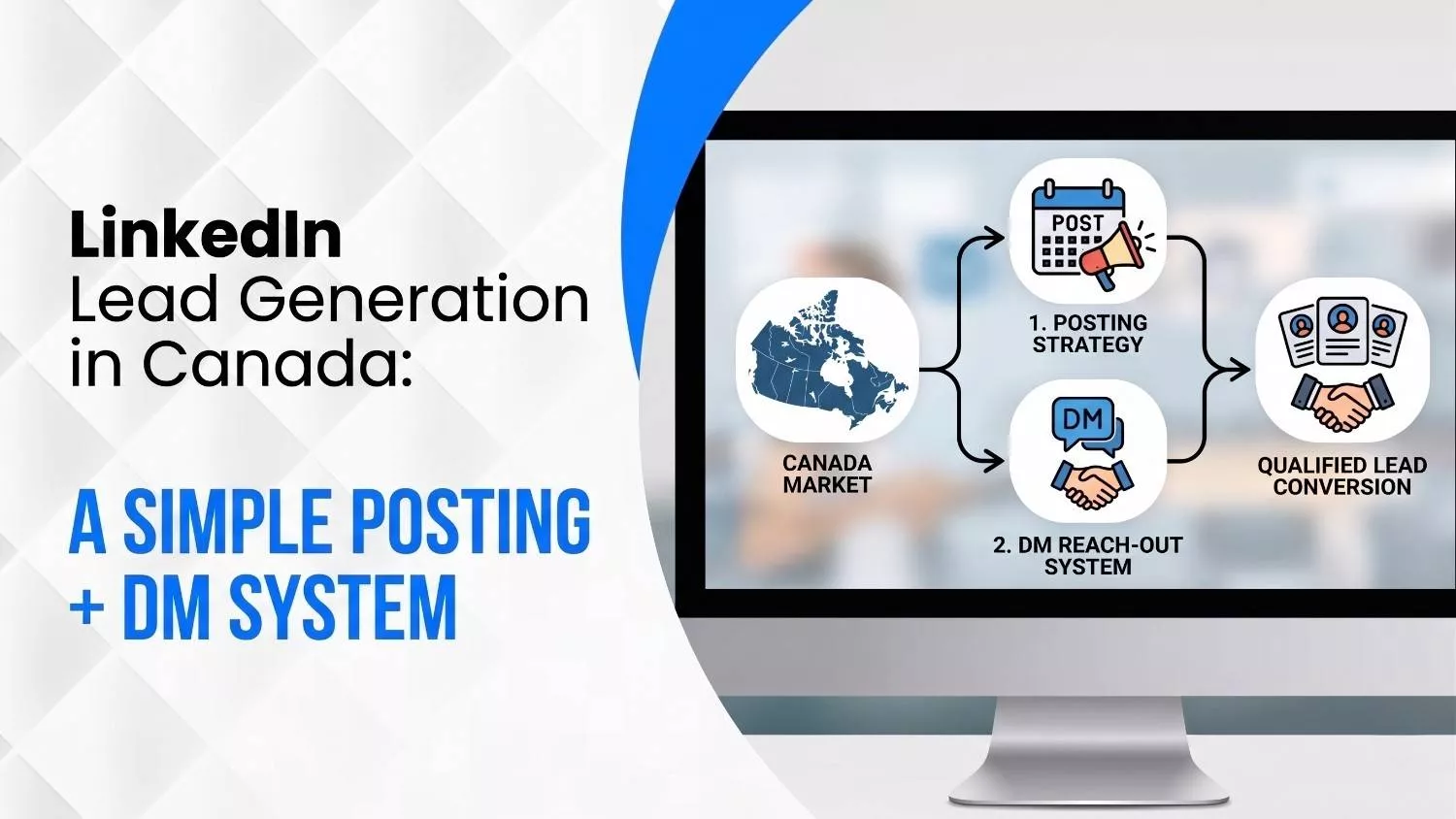
Here is the fast answer in three lines. Post to earn trust. Let comments start the talk. Then send a DM that books a quick call.
Think of it as a short path: Post → Comments → DM → Call → Client.
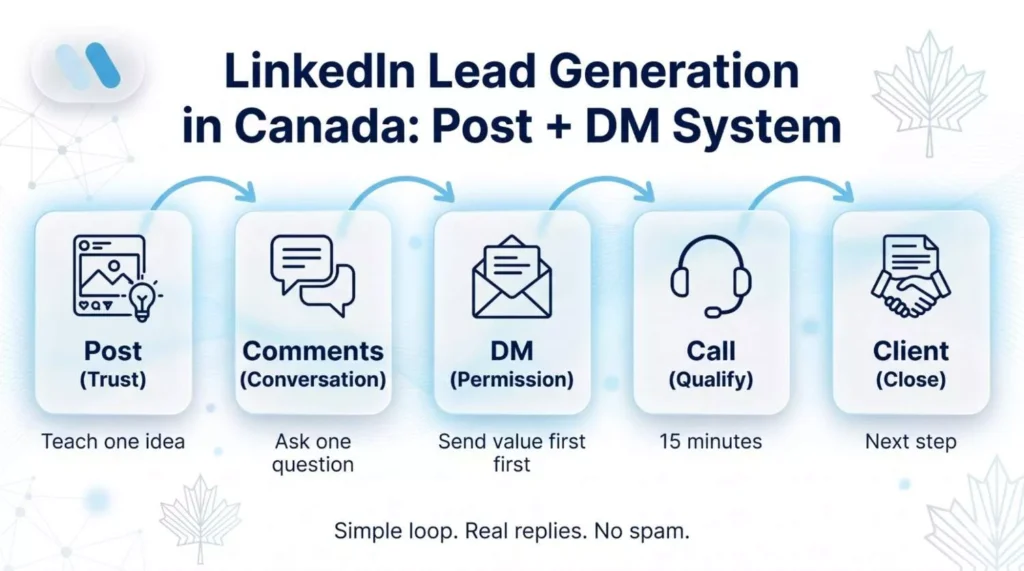
This guide walks you through a clean Post + DM system for 2026, built for Canadian lead quality and the rules we follow here. No spam. No fake urgency. Just a clear way to turn attention into booked calls. Our approach to LinkedIn lead generation has helped brands across Mississauga, Toronto, Calgary and beyond get replies that matter.
How LinkedIn Lead Generation Works in Canada in 2026
LinkedIn works because it puts business people in one room. You post an idea. Some read it. A few comments. A smaller group clicks your profile. The ones who match your offer end up in your DMs, and the best ones book a call. That is the whole loop.
It works for a simple reason. People buy after they trust you. That trust builds with small moments over time, not one cold message. According to LinkedIn Marketing Solutions, 89% of B2B marketers use LinkedIn for lead generation, and 62% say it is a real source of leads, over two times more than the next social channel.
What changed in 2026? Buyers filter harder. They check your profile, scroll your posts, and look for proof before they click. Your job is to give them a clear picture fast: what you do, who you help, and what happened for past clients. Then one clear next step.
Profile Setup: Banner, Proof, and One Clear CTA
Your profile is your front door. If it looks messy, people leave. The fix is simple. Match your banner, photo, and headline to one service and one outcome.
Your profile picture should look like a real person, not a stock photo. Your banner should say one clear promise, like "SEO for law firms in Ontario that want more calls." Your headline should say what you do and the result you bring, in plain words.
Next is the Featured section. Treat it like your portfolio page. Pin one case proof post. Pin your offer link. Add a booking page, and if you have one, a short report or checklist your buyer would actually want.
Pick one CTA only. Book a call, request a quote, or download a guide. Pick one and remove the rest. Two CTAs confuse people, and confused people click nothing. End with proof blocks in your About section. The short client wins. A clear "what we do" line. No big words. Just the stuff a buyer cares about.
Posting Stack: Content That Earns Comments and Saves
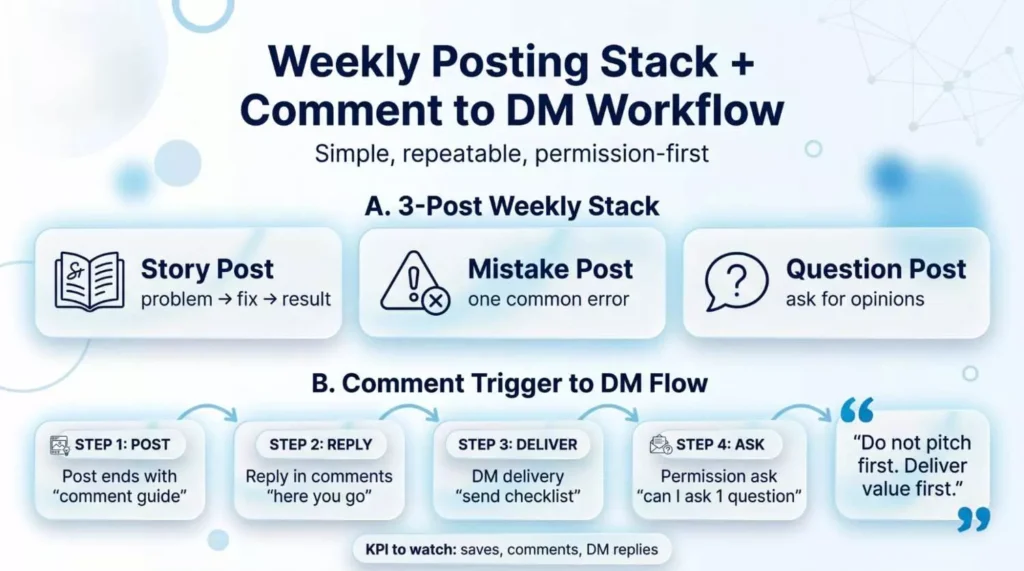
Content is the fuel. Without posts, your DMs stay cold. A simple weekly stack looks like this:
- One story post about a real client problem and how you fixed it
- One pain-point post that names a mistake buyers often make
- One question post that asks for opinions or tips
That is three posts a week. Nothing more. Keep them short, scannable, and written as you talk. Add a clear point of view. Do not sit on the fence.
Pay attention to the questions your community asks. Those are gold. Write posts that answer the questions people type into Google. This helps your post show up in search and keeps comments rolling in. Use hashtags only when they fit. Three tags are plenty. The algorithm cares more about how people react in the first hour than how many tags you stuff at the end.
Watch for shares and saves, not just likes. A save means someone wants to read it later. A share means they trust it enough to show their team. Those are the real signals of a strong post.
Comment Triggers That Turn Questions Into Warm DMs
This is where most people drop the ball. They post, get a few comments, and do nothing.
A clean trigger is this. End a post by saying, "Comment the word 'guide,' and I'll send you the checklist." When someone comments, reply in public first with a helpful line. Then send the checklist to the DM. It keeps things natural. No spam vibes.
The keyword here is permission. When a person comments, they are telling you they want more. That is consent, the right way. Use "thank you" replies to stay human. Keep messages short. Do not pitch on the first DM. Lead with the promised item. Then ask one small question if it fits.
Track what posts bring comments, shares, and saves. Those are the templates you build on next month. Drop what flops. Repeat what works. In a few weeks, you will notice two or three post types that keep bringing buyers into your inbox. Those become your new standard.
DM Workflow: Permission-First Messages That Get Replies
Cold DMs full of pitches get ignored. Canadians smell a sales script from a mile away. Here is a three-message flow that actually works.
- Message 1, value first. Send what you promised in the comment. Add one line at the end: "Mind if I ask one quick question about your work?" Wait for a yes.
- Message 2, quick fit check. Once they say yes, ask a short question that tells you if they are a match. For example: "Are you running ads yourself right now, or working with a team?" Their reply tells you what comes next. If they fit, offer a 15-minute call.
- Message 3, soft follow-up. If they go quiet, send one kind follow-up with a helpful tip, not a pitch. Example: "Saw this checklist on ad copy that cut cost per lead by 22 percent. Thought you might find it useful." Stop after one follow-up. Do not chase.
- Keep each message short. Three or four lines. Specific to them. Focused on the next step only. That is the whole workflow. Simple, and it respects people's time.
Lead Gen Forms and Ads: When Forms Beat DMs
There are moments when forms work better than chats. Think webinars, free reports, and short course signups. People are used to filling those in. LinkedIn Lead Gen Forms keep users inside the app, so the form fills itself with their info. Less typing, more signups.
Use forms when your offer needs volume. Use DMs when your offer needs trust and a warm hand-off.
For form setup, keep it simple. Name, email, and one qualifying question. That is it. Five fields drop conversions fast. One extra question helps you sort good leads from tyre-kickers.
Route your leads with care. Send form fills into a sheet, email tool, or CRM. Tag them by intent. Follow up inside 10 minutes when you can. The first business to reply usually wins. Connect forms back to your DM system too. When a lead fills a form, send them a short DM saying thanks and confirming the next step. The hand-off feels expected, not sudden, and that small touch lifts show-up rates.
Automation Stack: Tools, Email, CRM, and Reminders
Automation helps when it saves time. It hurts when it spams. The rule is clear. Use tools for reminders, routing, and reports. Not for sending messages to people who never asked.
Set up a short email follow-up for "not now" leads. Two emails are enough. First email, three days later, with one helpful tip. Second email, ten days later, with a case study and a soft call offer. That is your light safety net.
Use a CRM with four stages: new, replied, qualified, and booked. Every lead lives in one of those. You always know what to do next. Our simple marketing funnel and CRM automation setup walks through the exact stages, fields, and triggers you can copy for your own pipeline.
Build a Friday report habit. Note how many comments you earned, how many DMs you sent, how many calls you booked, and the money sitting in your pipeline. Skip vanity numbers like follower count. They do not pay bills.
LinkedIn API and Tracking: UTMs, Tokens, Postman Tests
If you send traffic off LinkedIn, track it. Add UTM tags to your links so you know which post brought which click. Set up events on your landing page for form fills, button clicks, and booked calls. Now you can see which posts turn into real money.
The LinkedIn API is how bigger teams pull data. In plain words, the API needs authorization, an access token, and scopes. Authorization means you log in. A token is a short key. Scopes are what the key is allowed to do. Keep your token safe. Never share it in public code or screenshots.
A smart move is to save each post URL and share the URN in a spreadsheet. That makes reporting clean. You can tie every booked call back to the post that started it. Tools like Postman help you test API calls before you automate. Run a call. Check the answer. Once it works, move it to your dashboard. Keep it simple. Track what turns into meetings, not just views.
Conversion Funnel: From Post to Booked Call to Client
Your funnel has six stops: view, click, comment, DM, call, and client. If one stop leaks, fix that one stop.
Weak hook? People scroll past. Fix the first line. Good hook, no comments? Your post has no clear ask at the end. Fix the last line. Comments, no DM replies? Your first DM is too pushy. Soften it. DMs but no calls? Your offer is not clear, or the booking page is hard to use. Fix both.
Keep one checklist near your desk. Proof near the top of your profile. One CTA only. One next step per post. Short. Clean. Tested. Look at each stage once a week and ask one honest question: where are people dropping off? Then patch that one spot before you change anything else. Fixing one leak at a time is how small posting accounts turn into booked calendars.
Canada Rules: CASL Consent for Safe Outreach
Canada has a law called CASL, run by the CRTC. It covers email, texts, and DMs that push a product or service. The short version is this: get consent, say who you are, and give people a way to opt out.
Penalties are not small. The CRTC can issue fines of up to $10 million for a business violation, so compliance is not a "maybe." A consent-first habit is the way. This is why the comment trigger works so well. When a person comments "guide," they are inviting your reply. That counts as a form of consent. Official CASL guidance from the CRTC is worth a quick read for anyone running outreach to Canadian buyers.
When you message, state who you are and why you are reaching out. Keep follow-ups spaced and polite. If someone says stop, stop. No "one last pitch" note. A smart LinkedIn lead generation plan follows these rules by default, not as an afterthought. The more respectful your outreach, the more replies you get anyway.
Your 30-Day Plan: Publish, Engage, and Improve
You do not need a year to see results. Thirty days is enough to test this system end-to-end.
- Week 1: Rebuild your profile. Update the banner, photo, headline, and Featured section. Add tracking links. Pick your one CTA.
- Week 2: Post three times. Reply fast to every comment. Start a comment trigger. Log what gets shares and saves.
- Week 3: Run the DM workflow every day. Aim for five thoughtful DMs per day, not fifty. Refine your scripts based on the replies you get.
- Week 4: Add a Lead Gen Form or a small ad if your offer is clear. Publish a proof post with a real client result. Send a short thank you to past clients and ask for a referral.
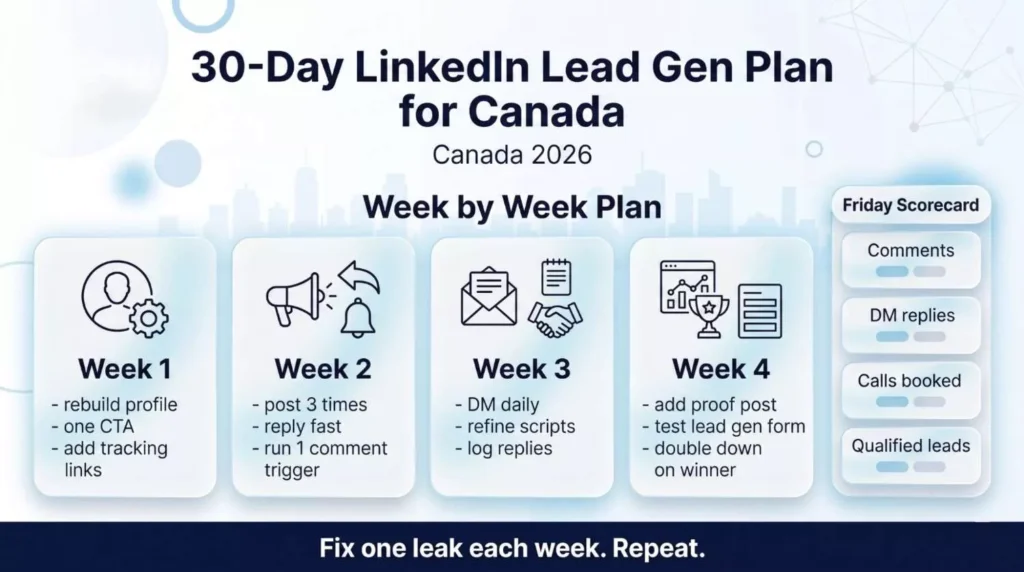
Every Friday, write a half-page report. Comments earned. Replies. Calls booked. Notes on lead quality. Thirty days of this will teach you more than most courses you can buy online.
Final Note: Repeat the Loop and Book Calls Weekly
Post to earn attention. Let comments start the talk. DM to book the call. Repeat. That is the whole game.
If you run this system for 30 days with care, you will see calls on your calendar. Scale what gets replies. Cut what does not. And if you want a fresh pair of eyes, the team at Wide Ripples Digital can audit your profile, your last 10 posts, and your DM flow, then hand you clear fixes to lift reply rates. Canadian businesses pick us because we know the local buyer, the local tone, and the rules that come with reaching them.
Quick FAQs
1. What is LinkedIn lead generation?
2. Does LinkedIn lead generation work?
3. How do you generate leads on LinkedIn?
4. What are LinkedIn Lead Gen Forms?
5. How do LinkedIn Lead Gen Forms work?
6. Where do LinkedIn Lead Gen Form leads go?
7. Are LinkedIn Lead Gen Forms free?
Disclaimer: The information provided in this blog is for general informational purposes only. It is not legal advice and should not be relied on as such.
Written by Khadija
Last updated April 28, 2026