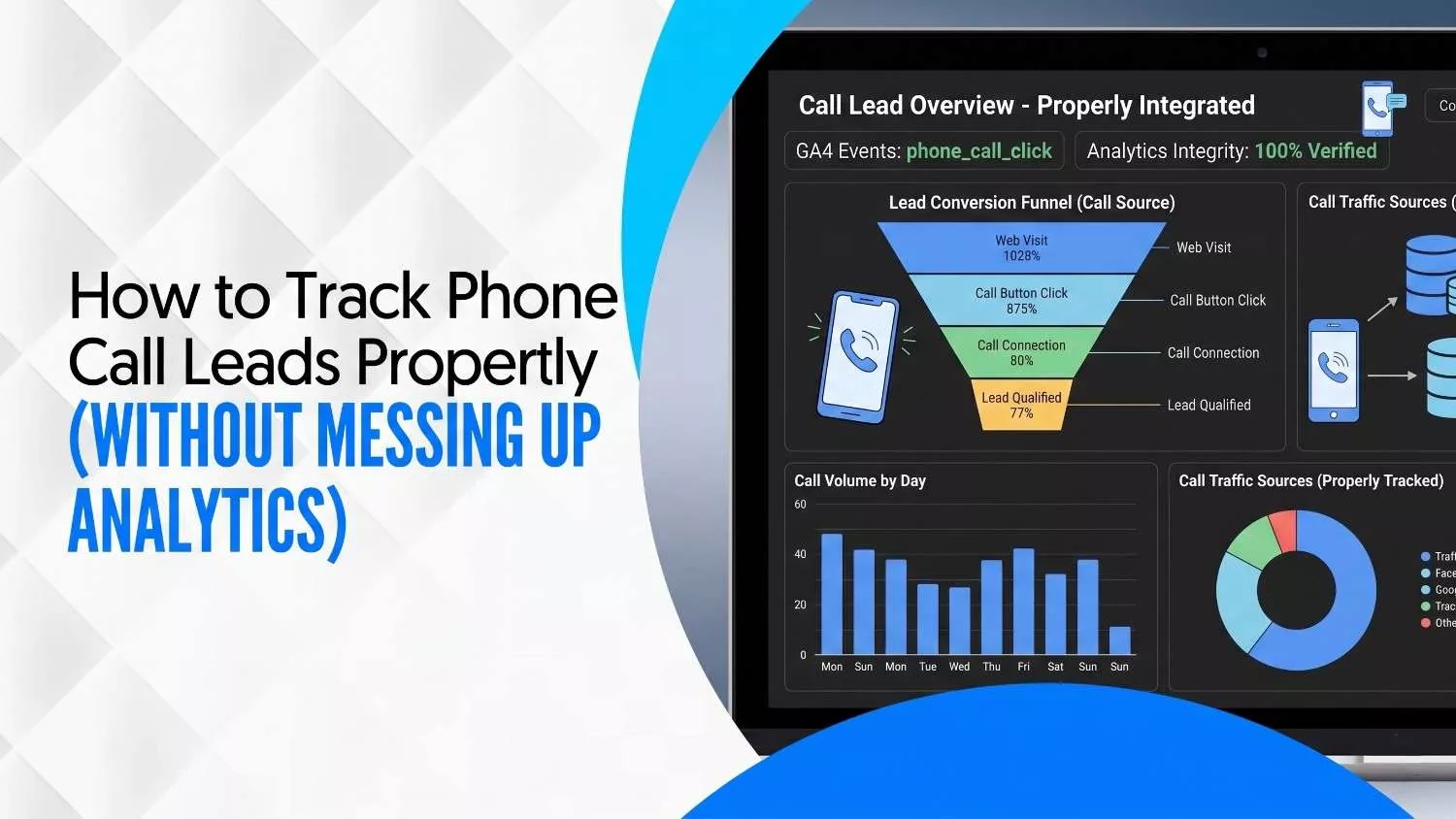
How to Track Phone Call Leads Properly (Without Messing Up Analytics)
Your phone keeps ringing. Your Google Ads keep running. But when you open your reports, the numbers never match the money you actually earned. Calls go missing. Conversions get counted twice. Half your leads never reach your CRM.
This guide shows you how to track phone call lead activity the right way, without breaking your analytics, miscounting conversions, or losing real sales insights.
You will learn how to:
- Track call tracking for lead generation correctly
- Improve conversion rate and sales pipeline visibility
- Connect calls with CRM, Google Ads, and real revenue
You will also see how a smart lead generation system in digital marketing keeps your call data tidy and your sales pipeline full from the first ring to the closed deal.
Why Most Call Tracking Setups Break Analytics Data
Most call tracking breaks on day one. Business owners paste a tracking script, turn on their ads, and walk away. A week later, GA4 shows call events firing twice, sessions breaking in the middle, and paid clicks labelled as organic traffic.
The first issue is duplicate tracking. Two scripts fire at the same time, so every call gets counted twice. Your conversion rate looks amazing, but it is fake. You build a strategy on numbers that were never real.
The second issue is wrong attribution. A visitor comes from a Google ad, leaves your site, returns through organic search, and then calls. Your system logs it as organic. You lower your ad budget because the ad looks weak. That is a bad call based on bad data.
Tracking calls is not the same as tracking them well. Clean data needs a plan.
What Proper Call Tracking Should Measure for Leads
A call is not always a lead. A lead is not always a sale. Mixing these three up is the main reason sales reports lie to you.
Start with three clear groups. A call is any ring you get. A lead is a caller who matches your buyer profile and shows real interest. A qualified prospect is a lead ready to move to a quote, demo, or booking.
Counting only calls makes you feel busy. Counting real leads tells you if marketing is working. Counting qualified prospects tells you if sales can actually close them.
Customer inquiries and real client acquisition are two different things. Someone asking about business hours is an inquiry. Someone asking for pricing is a lead. Volume tricks you into thinking more is better. In lead generation, five strong calls beat fifty junk ones every single time.
Call Tracking Framework for Clean Data and Accuracy
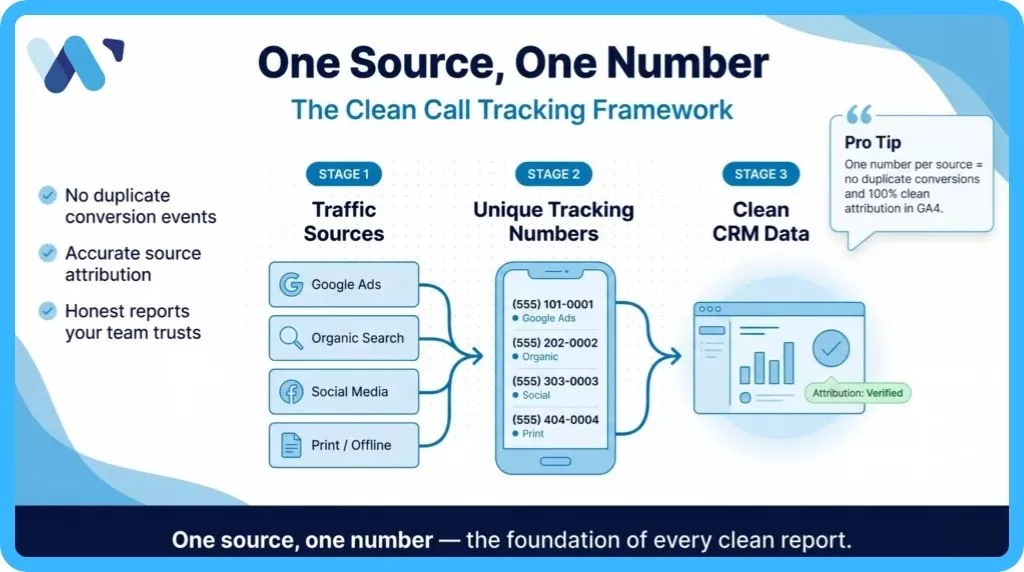
Clean tracking comes from one simple rule: one source, one number.
Give every traffic source its own phone number. Google Ads gets one. Organic search gets one. Facebook gets one. Your printed flyers get one. When someone calls, the system knows exactly where that lead came from. No guessing, no overlap.
Then remove duplicate events in GA4. Open your tag manager, find the call conversion tag, and make sure it fires once per session. Check that your CRM is not also sending the same event through a side path.
Keep the setup simple:
- One phone number per traffic source
- One conversion tag per call event
- One single place where call data lands before it flows to your CRM
When your framework stays clean, your reports stay honest, and your team stops arguing over the numbers.
Lead Qualification Through Smart Call Tracking
Not every ring deserves your sales team. A smart tracking system sorts calls before a rep even picks up the phone.
Start by tagging calls by type. Inbound calls come from your marketing. Outbound calls are cold calling your reps make. Some callers are spam. Some are job seekers. Some ring you by accident.
Modern call tracking tools let you set filters. Short calls under 30 seconds usually mean a wrong number. Repeat calls from the same bad number mean spam. Pull these out of your lead count right away.
Now you can see real patterns. If Google Ads brings fifty calls a month and only twenty last over a minute, your real lead number is twenty. That smaller, honest number is what your sales pipeline should run on, not the fake fifty that makes your dashboard look shiny.
Call Quality Scorecard to Lift Your Conversion Rate
A scorecard turns phone calls into measurable results. You stop guessing and start scoring every single conversation.
Rate each call on four points. Give each one a score from 1 to 10.
- Intent: Did they ask about buying or just browsing?
- Fit: Are they your target buyer in your service area?
- Urgency: Do they need it this week or next year?
- Outcome: Did the call end with a clear next step?
Add the four scores. Calls above 30 are hot leads. Calls between 20 and 30 need follow-up within a day. Calls below 20 can wait or get dropped.
Now train your reps on the top scores. What did they say? What did the buyer ask? You will see patterns that push your conversion rate higher week after week. Scoring also helps you spot which marketing channels bring the hottest people. That alone can reshape where you spend your budget.
Multi-Channel Attribution for Phone Call Leads 2026
Most phone calls do not start with a call. They start with a search, an ad, a social post, or a review. Then later, the buyer picks up the phone.
That gap is where attribution breaks. Your system sees only the last touch. You give credit to a Facebook ad when the buyer first found you through Google two weeks earlier.
Fix this with a UTM-to-call flow. When someone clicks an ad, store their source in a cookie on your site. When they later call the number on your page, attach that source to the call record. Now you see the full path from first click to phone ring.
According to Invoca's 2025 Call Conversion Benchmarks Report, which looked at more than 60 million calls, over a third of phone leads close during the call itself, and 61 percent of callers reach a live person rather than voicemail or a bot. If you do not tie those calls to the first click, you underrate your best ads and shut them off far too soon.
Missed Calls and Response Time Impact on Conversions
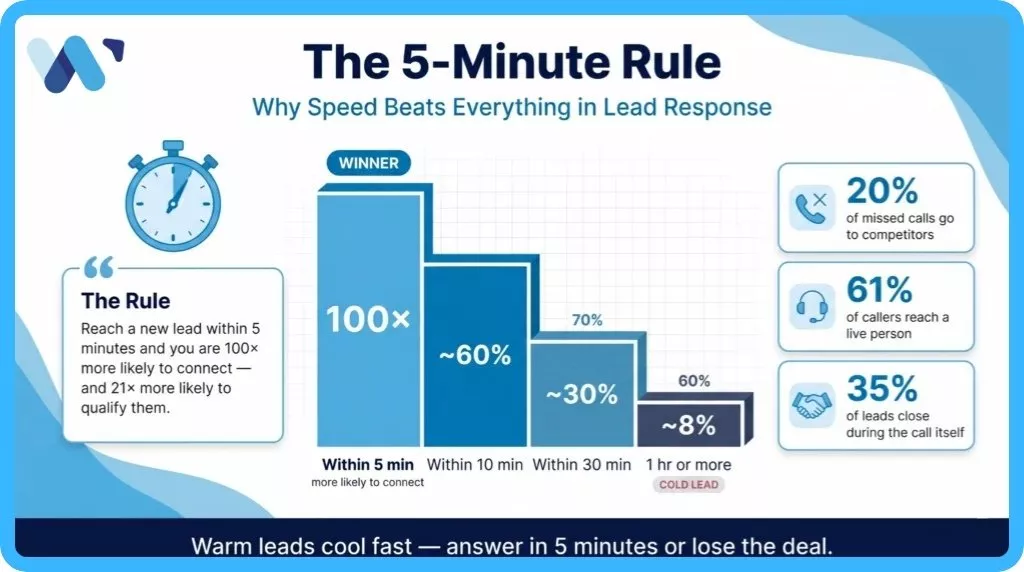
Speed is the quiet killer of call leads. A ring you miss is money a competitor picks up.
The classic Lead Response Management Study, backed by Harvard Business Review research, showed that businesses reaching a new lead inside five minutes are roughly 100 times more likely to connect than those waiting half an hour. Five minutes. That is the rule nobody can afford to ignore.
Track your missed call rate every week. If 20 calls ring in and 4 go to voicemail, that is 20 percent of your leads going cold. Most of those callers will pick a competitor before you even see the missed call alert on your phone.
Set up a call forwarding chain. If no one picks up on three rings, the call jumps to a second rep. Add an automatic text that says someone will call back in 10 minutes. Warm leads cool fast. Systems built for speed keep them warm long enough to close.
AI Call Tracking and Automation Trends for 2026
AI now handles what teams used to spend hours on. It listens, tags, and scores calls in real time.
Modern call tools record every conversation, then run it through AI. The system writes a summary, picks out buyer questions, flags spam, and rates the call for intent. By the time a manager opens the dashboard, the messy work is already done.
Automation also closes the follow-up gap. A call ends. AI sends a summary to the rep and drops a task in the CRM. The lead gets a personalized text in 60 seconds. The deal stays alive.
Pairing AI call tools with a well-built lead capture landing page gives you a full loop. The page grabs the click. The call turns the click into a real conversation. The AI keeps the lead moving between both sides. That closed loop is how 2026 marketing teams win more deals on smaller ad budgets.
Tracking Calls Without Slowing Website Performance
Call tracking scripts are heavy. Stack three or four of them and your site crawls. Slow sites push buyers away before they even see your phone number.
Check your page speed first. Open Google PageSpeed Insights and run your main landing pages. If your Largest Contentful Paint goes over 2.5 seconds, your tracking scripts may be the cause of the lag.
Fix this with three moves. Load scripts with the defer or async tag. Remove old call trackers you no longer use but forgot to pull off the site. Switch to one main call provider instead of layering several that do similar things.
A fast site keeps buyers on the page long enough to find your number. A slow site loses them before the call even starts. Every second matters in lead generation, and your call tracking setup should help your site speed, not fight against it.
CRM Integration to Connect Calls With Sales Pipeline
A call that never reaches your CRM is a call you will forget. CRM integration is the bridge between the ring and the revenue.
Pick a call tracking tool that talks to your CRM out of the box. HubSpot, Salesforce, Zoho, and Pipedrive all support this with native connectors. When a call comes in, the system creates a lead record, logs the call details, and adds the source. The rep sees it before the phone stops ringing.
Now you can follow a lead from the first call to the signed deal. You see how long it took. You see which rep handled it. You see which ad paid for it in the first place.
This is how client acquisition becomes a number, not a guess. Every deal has a clear story. When you look at your pipeline, you know exactly where the next sale is coming from and how to make more of them happen.
Google Ads Call Tracking for High-Intent Leads
Phone leads from Google Ads are gold. Someone searching, clicking, and then calling is ready to buy. If you are not tracking these calls the right way, you are flying blind with paid budget.
Turn on call extensions in Google Ads. These show a phone number right inside the ad. When someone taps it, Google logs the call as a conversion. You can see how long each call lasted and which keyword caused it.
Also set up website call tracking. This uses a dynamic phone number that swaps in whenever a Google Ads visitor lands on your site. It tells Google the call came from a paid click, even if the visitor browsed around for a minute first.
Now you can make smarter choices. Pause keywords that bring clicks but zero calls. Pour more budget into keywords that bring real phone conversations. That is how you cut waste and raise your return on ad spend.
Call Tracking Debugger to Fix Data and Errors Fast
Call tracking breaks. It is not a question of if, but when. A weekly debug habit keeps small errors from turning into wrecked reports at the end of the month.
Run through this quick list every Friday:
- Make a test call from a new number. Does it show up in the dashboard?
- Check GA4. Is the call event counted once or twice?
- Look at Google Ads. Does the conversion match your call tracking tool?
- Open your CRM. Did the lead get created with the right source tag?
If any of these fail, stop and fix the issue. Common fixes include refreshing the tracking script, re-linking your Google Ads account, or resetting the CRM webhook. Most fixes take under fifteen minutes. The cost of ignoring them runs into thousands of wasted ad dollars a month.
30 Day Plan to Improve Call Tracking and Lead Flow
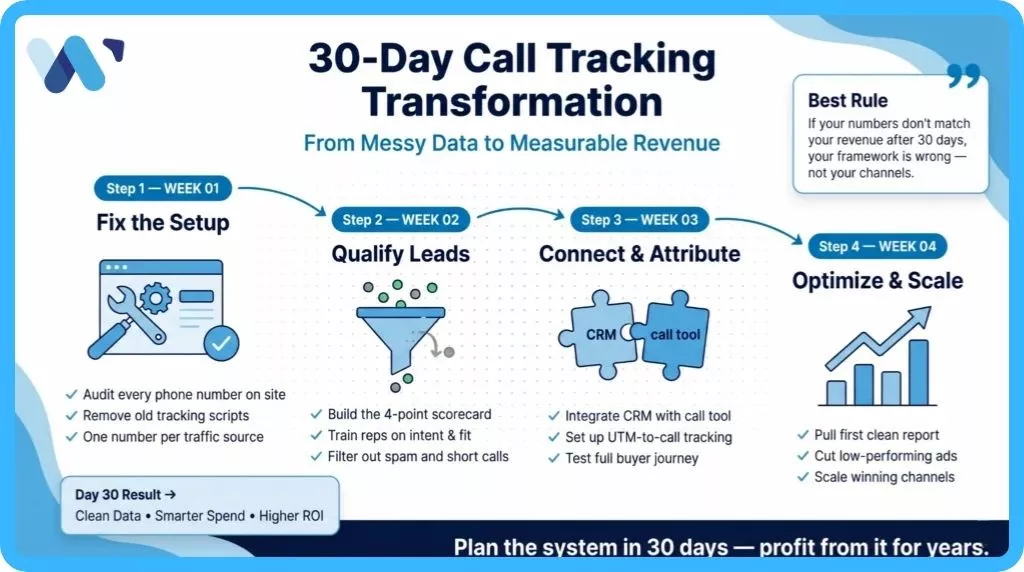
Thirty days is enough to go from messy to clean. Here is the plan week by week.
- Week 1: Fix the setup. Audit every phone number on your site. Remove old scripts. Set one number per source. Check that GA4 fires each call event only once per session.
- Week 2: Add qualification. Build your scorecard. Train reps on the four points of intent, fit, urgency, and outcome. Start filtering spam and short calls out of your reports.
- Week 3: Connect CRM and attribution. Link your call tool to your CRM. Set up UTM-to-call tracking so you see the full buyer path from first click to phone ring. Test with real calls.
- Week 4: Optimize based on data. Pull your first clean report. Cut low-performing ads. Spend more on the keywords and channels bringing real leads. Set weekly review meetings with sales.
By day 30, your call data tells the truth. Your team trusts the numbers. Your marketing choices get sharper. Your revenue starts moving in the right direction.
Final Note: Track Calls That Actually Grow Revenue
Call tracking is not about collecting more numbers. It is about learning what each call is really worth.
Focus on lead quality over call volume. Fifty calls with no buyers is a waste. Ten calls with five real prospects is a win. Build every metric around quality, not noise.
Strong systems pay you back every single month. Clean data means smarter ad spend. Smarter ad spend means lower cost per lead. Lower cost per lead means more profit from the same budget.
If setting this up feels like a lot of moving parts, the team at Wide Ripples Digital can help. They build call tracking, CRM flows, and ad systems that match each other, so your reports match your bank account. Your phone will still ring the same. What changes is how much of that ringing turns into real, trackable revenue.
Quick FAQs
1. How to track phone call leads correctly in analytics?
2. What is phone call lead tracking in Google Ads?
3. What are the main types of phone call leads?
4. What is the 5 minute rule for handling leads?
5. How do missed calls affect lead generation results?
6. How to connect call tracking with CRM systems?
7. Are phone calls recorded legally in Canada?
Written by Neha Ghauri
Last updated April 30, 2026