Website Migration SEO Checklist: Protect Rankings During a Redesign

Download the Website Migration SEO Checklist
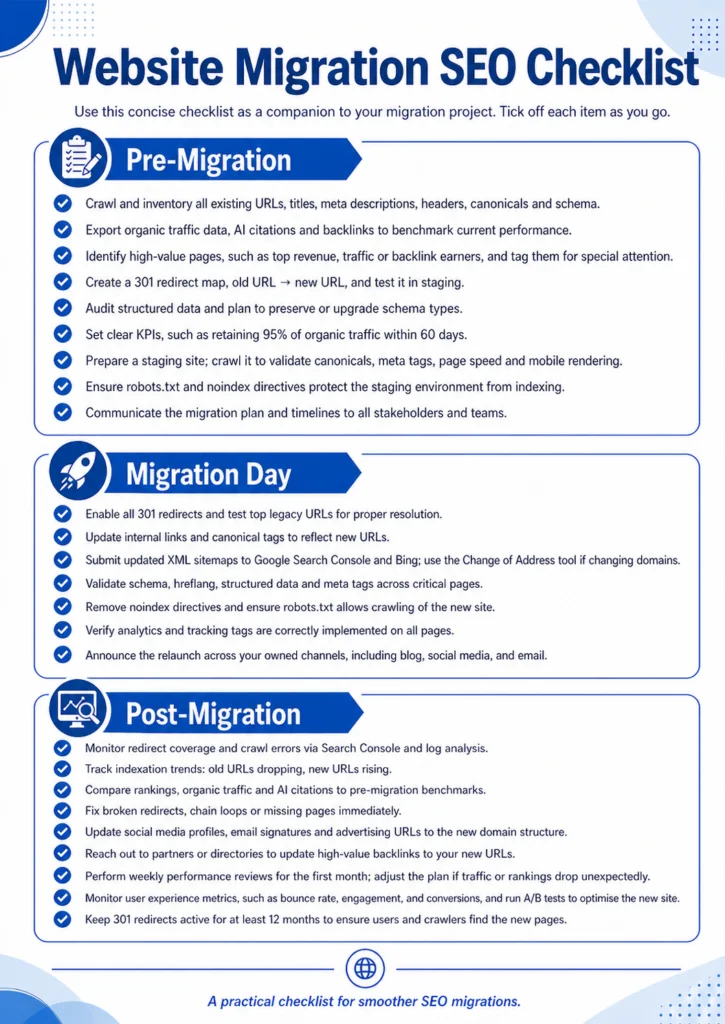
Planning a redesign, domain change, CMS move, or URL restructure? Use this practical checklist to protect rankings, redirects, traffic, analytics, schema, and important SEO assets before, during, and after migration.
- ✓Pre-migration SEO checks before launch
- ✓Migration day tasks for redirects, tracking, and sitemaps
- ✓Post-launch monitoring steps to catch ranking and traffic issues early
Understanding Site Migration
A “site migration” is any substantial change to your website’s domain, structure or platform that affects how it appears in search. According to experts, migrations include domain changes, protocol shifts (HTTP→HTTPS), URL restructures, CMS migrations, redesigns, mobile migrations and site consolidations. During a migration, you’re not just moving pages; you’re moving your hard-earned SEO equity, rankings, backlinks, structured data and AI citations.
Migrations happen more often than you might think. Experts note that most of the SEO work occurs before launch, and a detailed audit helps benchmark performance. Web design statistics remind us why redesigns matter: 75% of people judge a company’s credibility based on its website design and 88.5% of visitors leave if a site loads too slowly. These data points make a strong case for refreshing your website while meticulously preserving your search visibility.
Phase 1: Pre-Migration Planning and Risk Assessment
Preparation is everything. Most of the SEO work should happen before the move, and a detailed audit encourages holistic thinking.
1. Audit and Benchmark
Start by crawling and inventorying every URL, title tag, meta description, canonical tag and internal link on your site – your “moving checklist”. Exporting this data helps build redirect maps and preserve metadata. Use reliable crawling tools to crawl the site and export the data into a spreadsheet. Also benchmark organic traffic, AI citations and backlinks so you can measure success. Search performance and analytics exports will form the baseline.
2. Identify High-Value Pages and Assets
Not all pages are created equal. Identify which URLs drive revenue, conversions or strong backlinks. List pages with high clicks, revenue or engagement and tag them in your tracking tools. These high-value pages deserve extra scrutiny during the migration.
3. Set Benchmarks and KPIs
Set realistic goals such as “maintain 95% of organic traffic and AI citations within 60 days”. Without benchmarks, you won’t know whether your migration was a success or a fiasco.
4. Create a Redirect Strategy
Redirects are the lifeboats for your rankings. Use permanent 301 redirects, not 302s, and test them in staging. A 301 redirect signals to search engines that a page has moved permanently and passes authority.
Develop a 1-to-1 redirect map where every old URL has a clear new destination. Avoid redirect chains or loops, as they dilute link equity and slow down your site. If your URLs follow predictable patterns, such as only the domain changing, wildcard redirects may be efficient. If not, invest time in manual mapping.
5. Plan Structured Data and Schema
Structured data influences not only search rankings but also AI-generated answers. Audit your schema types, such as Product, Article, and FAQ, and ensure they remain intact or are upgraded post-migration. Preserve canonical tags to avoid duplicate content and maintain image optimisation – an often-overlooked area during redesigns.
6. Prepare Your Staging Environment
Before launch, build a staging version of your new site. Crawl it to verify that canonicals, meta tags, structured data and page speed are correct. Block search engines from indexing the staging site through robots.txt and noindex tags to prevent duplicate versions from being indexed.
7. Communicate with Your Team and Stakeholders
A successful migration isn’t just about developers and SEOs; marketers, content writers, PPC managers and even customer service teams need to know the timeline. Use project management tools to share the redirect map, KPI targets and staging credentials. Coordinate with developers to ensure that the 301 plan is implemented exactly as mapped.
Phase 2: Migration Day – Execute with Precision
Migration day is like the big move into your new home: you need boxes, 301 redirects, ready, utilities, analytics and tags, connected and doors unlocked for visitors
Go-Live Checklist
- Launch 301 redirects: Enable all 301 redirects at go-live and test your top 100 legacy URLs.
- Switch internal links: Update internal links and canonical tags to reflect the new URL structure.
- Submit sitemaps: Submit your updated XML sitemaps to search engine webmaster tools. If you changed domains, use the proper change-of-address tool.
- Validate structured data: Check schema markup, hreflang and other tags to ensure they transferred correctly.
- Check robots and analytics: Remove any noindex directives used during staging, and verify that analytics and marketing tags are firing properly.
Search engine documentation notes that moving a site can cause temporary fluctuations in rankings and traffic; expect a few weeks for crawlers to recrawl and reindex the new URLs. Time the move during low-traffic periods and change only one thing at a time, for example, don’t switch domain, CMS and design simultaneously.
Phase 3: Post-Migration Monitoring and Optimisation
The first month after a migration is critical. It’s when you catch errors, reassure search engines and prove that your redesign wasn’t a risky gamble.
1. Track Indexation and Redirect Coverage
Use search performance tools to monitor how many old URLs drop out of the index and how many new URLs appear. Watch for crawl errors and redirect chains. Use reliable monitoring tools to monitor logs and confirm bots are crawling the new site.
2. Monitor Traffic, Rankings, and AI Citations
Compare traffic and rankings to your pre-migration benchmarks. If high-value pages drop, investigate whether their redirects, internal links or metadata are correct. Run a weekly performance review, especially for ranking volatility and indexation gaps.
3. Fix Issues Quickly
If you detect missing pages, chain redirects or misconfigured schema, fix them immediately. Permanent redirects, 301s, help preserve link credit and authority. Don’t wait for problems to snowball; each broken link is like leaving furniture on the curb during your move.
4. Update External Links and Marketing Collateral
Change your social media bios, ad destination URLs and email signatures to reflect the new domain or URL structure. Also reach out to partners and update backlinks.
5. Keep an Eye on User Experience
A migration is an opportunity to improve UX. With 89% of visitors likely to go to a competitor after a poor experience, track metrics like bounce rate, engagement and conversion rate. Perform A/B tests on the new site to ensure it converts better than the old one.
Pro Tips and Common Pitfalls
- Split your migration into smaller sections: Move a small section first to test the effects, especially for large sites.
- Don’t change everything at once: If you need to switch your domain, CMS and design, tackle them separately to isolate issues.
- Keep 301 redirects indefinitely: Search engines may take months to process all pages; remove a redirect only when you’re sure no one is using the old URL.
- Communicate internally: Ensure all teams, PPC, email, social, and customer service know about the migration so they can update links and messaging.
- Don’t forget non-HTML assets: Move PDFs, images and downloadable files and set up redirects for them.
- Time it right: Schedule the migration during low-traffic periods, such as weekends or off-season, so fewer users are affected.
- Monitor AI search presence: Generative AI features are sensitive to structured data and topic consistency. After migration, check whether your pages still appear in AI Overviews and update schema or content accordingly.
Conclusion: Migrate with Confidence and Grow Beyond
A site migration can feel like juggling while riding a unicycle on a tightrope. However, with proper planning, clear communication and meticulous execution, you can not only preserve your rankings but also come out with a faster, more user-friendly and AI-ready website. Migrations should be engines for growth, not disasters, and best practices reinforce that planning and patience are key.
If you’re considering a redesign, our team at Wide Ripples Digital is here to guide you. We’ve earned a 4.8-star rating from over 5,000 happy clients and we specialise in SEO-first website design, local expertise and transparent reporting. Book a free audit today, and let’s move your site without losing a drop of search equity. Outsmart, Outshine, Outclick – that’s the Wide Ripples way.
Quick FAQs
How long will a migration affect my rankings?
Should I pause my paid campaigns during migration?
Do I need an agency for small sites?
Can I use 302 redirects?
Do I need to update social media links?
Disclaimer: The information provided in this blog is for general informational purposes only. For professional assistance and advice, please contact experts.
Written by Khadija
Last updated May 11, 2026