Rank Math SEO: Best Settings, Setup Guide and AI Features for 2026

Rank Math is a free WordPress SEO plugin that manages your titles, meta descriptions, schema, sitemaps, redirects and a growing pile of AI tools from one dashboard. The best 2026 setup takes about ten minutes: run the setup wizard, connect Google Search Console, switch on only the modules you actually need, then let Content AI, AI Link Genius and AI Visibility handle the boring parts.
That is the short version. If you want the "why," a heads-up about the three settings people always get wrong, and a plain-English tour of the new AI features, keep reading. Fair warning: this plugin has more toggles than a jumbo jet cockpit, and flipping all of them on is a fantastic way to confuse Google and yourself at the same time.
One number sets the stage. WordPress powers 40.7% of every website on the internet and holds 59.0% of the entire content management system market. When almost half the web runs on the same platform, the SEO plugin you choose, and how you set it up, is one of the few levers that still makes you stand out.
What is Rank Math, and why does everyone keep recommending it?
Rank Math is an all-in-one SEO plugin for WordPress. Instead of one tool for sitemaps, another for redirects, a third for schema and a fourth for social previews, you get the whole toolbox in one place, sitting quietly under your posts and telling you what to fix.
The numbers back up the hype. Over 4 million WordPress websites now run Rank Math, and it holds a 4.8 out of 5 rating from more than 7,400 reviews on the official WordPress plugin directory. For a plugin that launched in 2018 as the tool nobody had heard of, that is a serious glow-up.
The reason it spread so fast is simple. The free version does a lot of things that used to sit behind a paywall, and it is available in 37 languages while running on WordPress 6.7 or newer, so most modern sites are ready for it out of the box.
Here is what a single install quietly replaces:
| Job you used to need a separate tool for | Rank Math handles it |
|---|---|
| Titles, meta descriptions and social previews | Yes, per post and site-wide |
| XML sitemaps | Yes, built in |
| Redirects and 404 tracking | Yes, with a manager and monitor |
| Schema / rich results | Yes, 16+ types on free |
| Google Search Console data | Yes, inside WordPress |
| Internal linking and image alt text | Yes, with automation |
Fewer plugins means fewer conflicts, fewer updates to babysit, and one less excuse to avoid your SEO.
Before you touch a setting: the 5-minute setup wizard
Rank Math practically configures itself, which is a polite way of saying the setup wizard does the heavy lifting so you do not have to guess. It launches automatically the moment you activate the plugin.
Walk through it in this order:
- Install and activate. Go to Plugins, Add New, search "Rank Math," install, activate. The wizard opens on its own. No treasure map required.
- Connect your free Rank Math account. This is optional but worth it. It unlocks keyword suggestions pulled from Google, the one-click SEO site analysis, and the AI features. The core plugin still works without it.
- Pick your site type. Blog, business, e-commerce, portfolio and so on. This one choice auto-configures a set of sensible defaults, so a bakery and a law firm do not get identical settings.
- Import from your old SEO plugin. If you were using another SEO plugin, Rank Math offers a one-click import for your titles, meta descriptions, focus keywords and redirects. More on switching safely below.
- Connect Google Search Console and Analytics. This pipes your real search data straight into the WordPress editor, so you stop opening seven browser tabs to check one keyword.
- Finish the wizard. You now have a clean, indexable baseline. That is genuinely most of the technical work done.
Easy Mode or Advanced Mode?
The wizard asks you to choose, and people freeze here like it is a final exam. It is not.
Easy Mode hides the jargon and applies safe, industry-standard defaults. Perfect if you just want it to work and get on with your day.
Advanced Mode unlocks every module and control. This is the one for agencies, developers and anyone who wants to fine-tune schema and technical SEO.
You can switch modes later, so pick Easy if you are new and graduate to Advanced when curiosity kicks in. Nobody gets hurt.
The best Rank Math settings for 2026
Defaults are good. A few deliberate tweaks are better. Here is the short, no-filler checklist we use, followed by why each one earns its place.
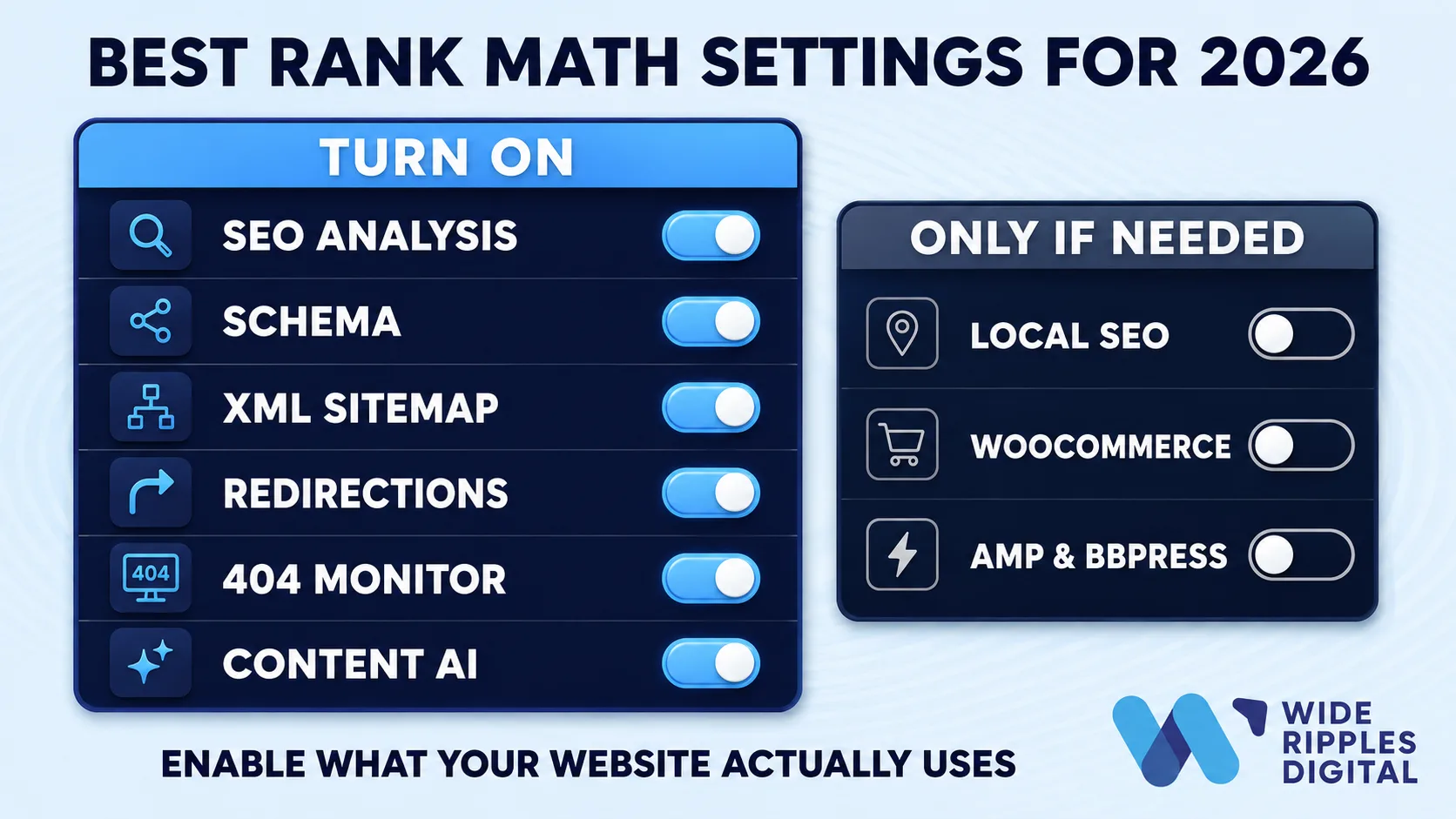
Turn these modules ON:
- SEO Analysis, so you can run a one-click site audit and fix what it flags
- Schema (Structured Data), so you win rich results and give AI search something clean to read
- XML Sitemap, so search engines find every page you care about
- Redirections and the 404 Monitor, so broken links get caught and sent somewhere useful
- Link Counter, so you can see internal linking at a glance
- Local SEO, but only if you serve a physical area or run a strong personal brand
- Content AI, so the AI tools are available when you write
Leave these OFF until you need them: AMP, bbPress, and any module tied to a feature or plugin you do not use. An unused module is just clutter with a switch.
In Titles and Meta, set your patterns once:
- Use variables (like site name and title) so you never hand-type a title format again
- Keep titles under roughly 60 characters and meta descriptions under roughly 160 so they do not get chopped in the results
- Set thin, low-value pages (tag archives, search results, some author pages) to noindex, so Google spends its time on pages that matter
Three settings people always get wrong
- They index everything. More indexed pages is not better. Noindex the thin stuff.
- They run two SEO plugins at once. This causes conflicts and duplicate tags. Pick one, disable the rest.
- They ignore Core Web Vitals. Rank Math is light, but your theme, images and hosting still decide your speed, and speed still affects rankings. Our guide on how page speed affects SEO and rankings breaks down what to fix.
Set these up once, and Rank Math mostly runs itself while you sleep.
The 2026 AI features, explained without the buzzwords
This is where Rank Math has changed the most. The plugin now bundles AI tools built specifically for SEO, and Content AI alone ships with more than 40 of them. Here are the three that matter most this year.

1. Content AI and RankBot: your SEO writing sidekick
Content AI helps you write content that is actually optimised, not just words on a page. It suggests the keywords, headings and questions to cover, fixes common SEO issues in one click, and generates image alt text so you stop leaving that field blank.
It also includes RankBot, a chat assistant that answers your SEO questions inside WordPress instead of sending you down a search-results rabbit hole. Content AI is free to start, then runs on credits.
A reality check: AI can draft and tidy, but it does not replace knowing your audience. If you want the difference spelled out, we wrote a whole piece on SEO versus content marketing and how they work together.
2. AI Link Genius: internal linking on autopilot
Internal linking is one of the highest-impact, most-ignored jobs in SEO, mostly because doing it by hand is tedious. AI Link Genius fixes the tedium. It suggests links as you write, lets you update hundreds of links at once from a single dashboard, finds orphan pages that nothing links to, monitors broken links and redirects, and auto-links keyword variations to the right pages. It is the difference between "I will sort out internal links someday" and them being sorted.
3. AI Visibility: showing up in ChatGPT, not just Google
This is the headline feature for 2026. Search is no longer only ten blue links. People ask AI assistants for recommendations, and you want to be the answer. AI Visibility tracks how your brand appears across AI platforms like ChatGPT, gives you an AI Visibility score, monitors the sentiment of those mentions, compares you against competitors in AI search, and shows you the actual transcripts, broken down by country.
If "getting recommended by AI" sounds like the next battleground, that is because it is. Strong entities, clean structured data and credible content are what earn those mentions, which is also why subject matter experts and E-E-A-T matter more than ever.
Rank Math Free vs Pro: what do you actually need?
Short answer: the free version is unusually generous, and a lot of small sites happily stay on it for years. You upgrade when you outgrow it, not before.
| What you get | Free | Pro |
|---|---|---|
| Titles, meta, sitemaps, redirects, 404 monitor | Yes | Yes |
| Google Search Console integration | Yes | Yes |
| Schema types | 16+ | 20+ plus an advanced builder and templates |
| Content AI | Start free (credits) | More generous access |
| Analytics and rank tracking inside WordPress | No | Yes, with position history |
| AI Link Genius bulk tools | Basic suggestions | Full bulk editing and audits |
| WooCommerce SEO | Basic | Advanced product schema and tags |
| Support | Community and email | Dedicated 24/7 |
Upgrade when you want in-dashboard analytics and keyword rank tracking, you need advanced schema at scale, or you run a WooCommerce store or agency workload. For current prices and renewal rates, always check the official Rank Math pricing page rather than trusting a number in a blog, because these things change.
Common Rank Math myths, busted
"It will slow down my website." Rank Math is built to be lightweight and does the job of several plugins, so installing it usually means removing others. Your speed is still shaped by your theme, images and hosting, so treat those with the same care.
"I need to pay to do anything useful." No. Titles, meta, schema, sitemaps, redirects, Search Console data and the start of Content AI are all on the free tier.
"A green SEO score means I will rank." This is the big one. A green score means your page is tidy. It is a clean kitchen, not a cooked dinner. Rankings still depend on real keyword research, content people want to read, technical health, credible links and time.
That last myth is the one that quietly costs businesses the most, so let us talk about it.
A plugin makes SEO possible. It does not make SEO happen.
Rank Math is a brilliant tool. But a tool does your SEO about as much as a treadmill does your cardio: it sets everything up perfectly, then waits for you to do the work.
Getting that green score is step one. Turning it into rankings, traffic and actual customers is a different job, and it takes keyword strategy, content that answers real questions, technical fixes, links and consistency over months. That is the part most owners do not have time for.
That is where a team earns its keep. Wide Ripples Digital is a full-service digital marketing agency in Mississauga, working with businesses across Canada, the USA and the UAE, and we run the SEO work off one strategy tied to a single number you can hold us to. We report on cost per qualified lead, not impressions, and you keep ownership of every account, profile and login from day one.
The results are the point. Across the accounts we can name, our campaigns lifted conversions between 30% and 63% and revenue between 50% and 159%, and our largest, an accounting firm, generated 2,780 leads over two years. We carry a 4.8-star rating from client reviews, and every engagement starts with a free two-week audit that shows exactly what is leaking, findings that are yours to keep either way.
Book a free strategy call and we will tell you what your rankings are actually worth, and what it takes to get them. No pressure, no jargon, no credit card.
Want to explore first? Our SEO and content strategy service page shows how we get you found for searches that end in a sale.
Frequently asked questions
Is Rank Math free to use?
Yes. Rank Math has a genuinely useful free version that covers titles, meta descriptions, schema, XML sitemaps, redirects, a 404 monitor, Google Search Console data and the start of Content AI. There is a paid Pro tier, but many small sites never need it.
Does Rank Math slow down my website?
No, it is built to be lightweight and does the work of several plugins in one, so most sites remove other plugins when they install it. Your real speed still depends on your theme, images and hosting.
Do I need to create a Rank Math account to use the plugin?
Not for the basics. A free Rank Math account is only needed to unlock the API features, such as keyword suggestions from Google, the SEO site analysis and the AI tools.
How do I set up Rank Math for the first time?
Install and activate the plugin, then follow the setup wizard that opens automatically. Connect your free account, choose your site type, import from any old SEO plugin, connect Google Search Console, and finish. It takes about ten minutes.
Can I switch to Rank Math without losing my rankings?
Yes. Rank Math has a one-click import that brings across your titles, meta descriptions, focus keywords and redirects from your previous SEO plugin, so search engines do not see a sudden change.
Can I run Rank Math and another SEO plugin at the same time?
It is not recommended. Two SEO plugins doing the same job cause conflicts and duplicate tags. Pick one and disable the others.
Which Rank Math modules should I turn on?
Keep SEO Analysis, Schema, XML Sitemap, Redirections, the 404 Monitor and Content AI on for most sites, and add Local SEO if you serve a physical area. Leave modules for tools you do not use switched off.
What is Content AI in Rank Math?
Content AI is a set of more than 40 AI tools built for SEO that help you write optimised content, fix SEO issues in one click and generate image alt text, plus RankBot for instant SEO help inside WordPress.
Does Rank Math help me show up in AI search like ChatGPT?
Yes. Its AI Visibility feature tracks how your brand is mentioned across AI platforms like ChatGPT, gives you an AI Visibility score, monitors sentiment and compares you against competitors in AI search.
Is Rank Math good for beginners?
Yes. The setup wizard applies safe defaults through its Easy Mode, and the plugin shows you what to fix right inside the post editor, so you do not need to be an SEO expert to get a clean baseline.
Does Rank Math work with WooCommerce and page builders like Elementor?
Yes. Rank Math supports WooCommerce with automatic product schema, and it integrates natively with Elementor, Divi and other major page builders.
Is a good Rank Math score the same as ranking on Google?
No. A green score means your page is technically tidy, not that it will rank. Rankings still depend on keyword strategy, quality content, links and time, which is the work a plugin cannot do for you.
Do I need Rank Math Pro, or is the free version enough?
The free version is enough for most small websites. Upgrade to Pro when you want keyword rank tracking and analytics inside WordPress, advanced schema at scale, or advanced WooCommerce SEO. Check the official pricing page for current rates.
Written by Neha Ghauri
Last updated August 25, 2026